| |
|
All three levels include
the RockWorks Datasheet and all of its tools for mapping XYZ data, modeling
XYZG points, creating stereonets and rose diagrams, creating Piper and
Stiff diagrams, creating animations, and much MUCH more. This is the
general RockWorks “toolbox.”
All three levels offer
access to the new RockWorks Playlist for program automation. Just click a
button in any program window to add it, and its current settings, to the
playlist, Build as many playlists as you want. Basic and Standard licenses
can have up to 5 items in each playlist; Advanced licenses can have
unlimited items.
All three levels can
define 3D faults to apply to surface and solid modeling. Basic and Standard
licenses can have up to 3 faults per project; Advanced licenses can have
unlimited faults.
All three levels also
include the Borehole Manager and its local database for storing and
managing borehole-based data.
With Basic, the borehole
processing tools are limited to borehole location maps, 2D and 3D strip
logs, and striplog profiles and cross sections. Simple correlation panels are offered for
Stratigraphy, I-Data, and P-Data in 2D section diagrams, but otherwise the
borehole visualization is limited to observed data – no modeling.
With Standard, you get all
of the modeling tools for the subsurface data offered in the Lithology,
Stratigraphy, I-Data, T-Data, P-Data, Fractures, Aquifers, and Vectors
menus, and all of the 2D and 3D diagrams and maps these menus contain.
With Advanced, you can
connect to a SQL-Server database on a network, run command scripts to for
advanced program automation. You also have access to the tools in the well
Production menu, and can import commercial PLSS land grids,
|
|
RockWorks is a comprehensive software program for creating 2D and 3D maps, logs and cross sections, geological models, volume reports, and general geology diagrams for the environmental, geotechnical, mining, and petroleum industries.
RockWorks is the standard in the environmental, geotechnical, petroleum, and mining industries for surface and subsurface data visualization, with popular tools such as maps, logs, cross sections, fence diagrams, solid models and volume calculations.
RockWorks offers numerous options for analyzing your surface and subsurface data, and accepts many different data types, such as stratigraphy, lithology, downhole geochemistry / geophysics / geotechnical measurements, color intervals, fractures, and aquifer data.
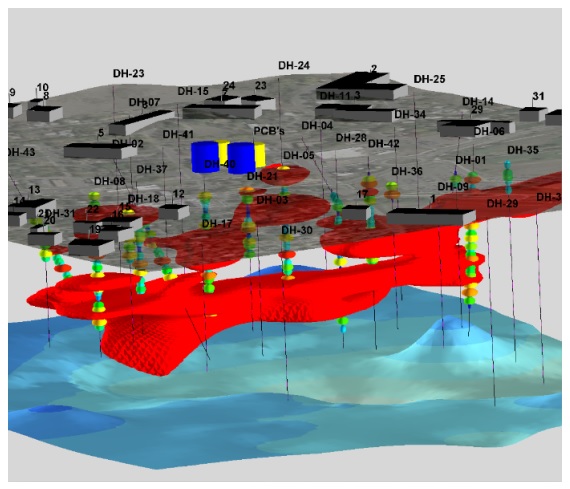
Lithologic Models are now displayed with a New Menu box within the Lithology Model Options that allows the user to turn on and off lithologic units. Volumetric calculations are updated with each change.
A new program titled “Migration Simulation” has been added to the Graphics / Animate menu. This program will create animations in which the low values migrate to the high values or vice-versa.
A new program titled “Distance to Point” has been added to the ModOps / Solid / Filters menu. This program will replace non-null nodes with values equal the straight-line distances between the nodes and a specified point source. 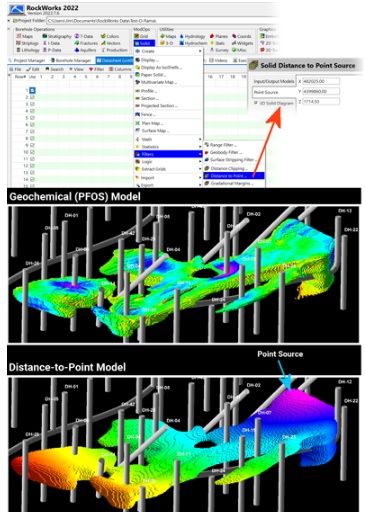
Added menu item under ‘Edit’ which will allow user to combine two data types in the Types Table.
This new tool works for Stratigraphy, Lithology, Well Construction, Aquifers, Bitmaps, I-Data, I-Text, P-Data, P-Text and T-Data Types Tables.
The Borehole Manager / Lithology / Multivariate Map program has been rewritten and enhanced to include bar chart, spidergram, and blended color maps.
Program Automation
The RockWorks Playlist offers easy automation – just click a button to add a program to the current Playlist. Then, click a button to run your Playlist to create models, maps, diagrams while you have lunch. Available for Basic (5 items), Standard (5 items) and Advanced (unlimited items).
The Playlist provides: Turn-key tools for colleagues or clients who need to use RockWorks capabilities without any downtime spent learning how to use it. A memory aid for projects that are infrequently re-visited.• An audit trail to serve as a record of what was done and all of the associated menu settings. Automation of data processing in which new data is being introduced on an ongoing basis (e.g. resampling and monitoring). A template for processing different data sets/sites using a streamlined workflow.
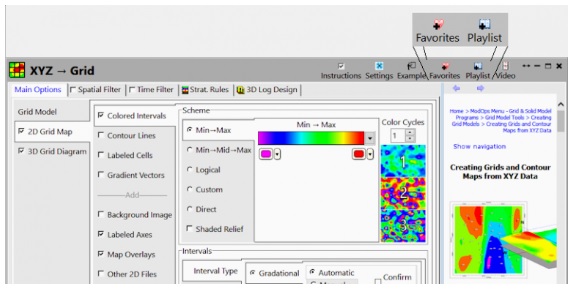
Recent Playlist Improvements: Launch an external program from within the Playlist to automate data transfer. Load dimensions from a sub-site within the project, and from a saved coordinate list. Easier navigation with multi-select cut/copy/paste. Playlist Button: Add the current application to the Playlist. Favorites Button: Add the current application to your Favorites List. Output Options: Export diagrams and reports directly to the desired output format.
RockWorks2022 should install, license, and run properly in Windows 8, Windows 10, and Windows 11. It is available as a 64-bit version. The 64-bit version supports larger models and faster processing, and requires a 64-bit version of Windows.
|